Import
Start from what you already have: a curl command, a Postman, Bruno or Insomnia collection, an OpenAPI description, or a recording of what your browser sent.
Import on the left opens the menu. Every import shows a preview first: what comes in, and anything for you to check. Then it opens as a new flow, or is added to the end of the open one (one undo step).
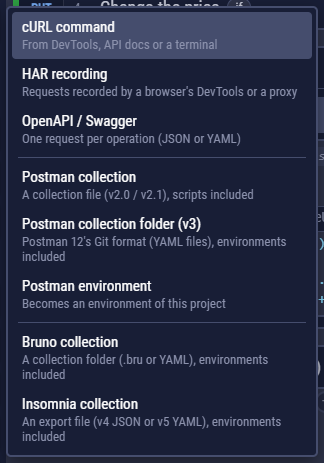
cURL
Three ways in: Import → cURL command (added at the end of the flow), + between two steps → cURL (added there), or paste the command straight into a request's URL field. That fills in the method, URL, headers and body and keeps the request's checks, extract rules and loop.
curl 'https://api.example.com/orders' \
  -H 'Authorization: Bearer $token' \
--json '{"item":42,"qty":2}'- Commands copied from browsers work (DevTools → Network → right-click a request → Copy as cURL, bash or cmd), as do ones from API docs and PowerShell (
curl.exe). - Understood:
-X,-H,-d/--data-raw/--data-binary/--data-urlencode,--json,-F,-uand--oauth2-bearer(they set the Auth tab),-b,-A,-e,-G,-I,-T,-o. - Shell variables such as
$TOKENbecome CLEM variables. - Whatever needs your attention (a file to put in the files folder, an option CLEM doesn't support) is listed above the request.
Postman
Import → Postman collection: pick the exported file (Collection v2.0 or v2.1, or a v3 collection saved as one file). For Postman 12's Git format, see Postman v3 folders below.
| In Postman | In CLEM |
|---|---|
| Folders | Name prefixes: Users / Create user |
Collection variables {{name}} | Flow variables $name (base-url becomes $base_url) |
| Auth (Bearer, Basic, API key, OAuth 2.0) | CLEM auth: the collection's is the flow's; a folder's or a request's own goes to its requests' Auth tab |
pm.environment / collectionVariables / variables .get / .set | $variables. Reading one nothing has set yet gives undefined, as in Postman: if (!pm.environment.get("token")) becomes if (!globalThis.$token). A name worked out in code (pm.environment.unset(names[i])) becomes globalThis[clemVarKey(names[i])], with a small clemVarKey function at the top that names the variable as the import does |
pm.response.json(), .code, .responseTime, .headers | response |
pm.test + pm.expect (a function or an arrow, () => pm.response.to.have.status(200)) | assertEqual(), assertContains()… or check(); tests on the status, time or a header go to the Checks tab. A chain with .and (.to.be.a("string").and.to.have.length.above(0)) checks each part; .length.above(n) and .lengthOf.at.least(n) check the length |
pm.test.skip | A comment: Postman only reports it as skipped |
| Folder and collection scripts | Run once where the folder starts (tests: commented) |
A script that can't run in CLEM as it is comes in commented out, with the reason, in a step whose name ends in "(to convert)". Nothing that would fail is left running. That covers:
- Postman calls CLEM writes differently. The reason says how to rewrite them:
pm.sendRequestbecomesawait http({ method, url, headers, body });postman.setNextRequestloops become a code block withawait request("rq_…");pm.cookiesbecomescookies.get(url, name). - Postman's old script API (
globals.x,environment.x) and the libraries its sandbox put in scope (lodash_,tv4,CryptoJS,cheerio). require()of a package (require("moment")): a code block gives only Node's built-in modules.- A "code library" run with
eval(…)ornew Function(…), such aseval(pm.collectionVariables.get("lib")). The code it runs sits in a variable, so the import never sees it to translate it. Put that code, rewritten for CLEM, in the flow's Functions or a library. - A translation that wouldn't parse. Every translated script is checked before the flow is saved; one that doesn't parse comes in commented out like the others, and the reason quotes the syntax error. This applies to Bruno and Insomnia scripts too.
- A script that was already broken in Postman, Bruno or Insomnia (a bracket or a quote that is never closed). The reason says it has a syntax error and what is never closed.
Requests with no URL come in with an empty one and a note, so you can fill them in. A Bruno request file that is empty or cut off (a block that is never closed) is skipped with a note naming the file, and isn't counted. An Insomnia request whose folder is missing from the file comes in at the top, with a note.
Imported flows keep running after a failed step, like Postman's runner (Flow Settings).
Import → Postman environment adds an environment (or a globals export) to the flow's project under a name you choose, and selects it. A v3 environment file (YAML) works too.
Postman v3 folders (Postman 12's Git format)
Postman 12 can keep a collection in a Git repository as a folder of YAML files: one .request.yaml file per request, and a .resources/definition.yaml for the collection and each folder. Newman can't run these; CLEM imports them directly.
- Import → Postman collection folder (v3).
- Pick the collection's folder, or the repository (or its
postmanfolder). When it holds several collections, choose one (the biggest is proposed); import the folder again for another. - The preview and the save work as for a Bruno collection: the flow is saved into a project, and the environments in
postman/environmentsbecome that project's environments, the first one selected.
The requests and scripts come over as from a v2.1 collection (the table above), plus:
| In the v3 files | In CLEM |
|---|---|
Folders and order | Name prefixes, in Postman's order |
| A collection's or folder's auth, a list of several (chosen by rules) | Inherited as in v2.1; of a list, the first is used (noted) |
GraphQL requests (graphql-request) | GraphQL requests, with the operation name |
WebSocket requests (websocket-request) | WebSocket requests that send the saved messages (binary ones as text, noted) |
| Request settings: follow redirects off, HTTP version | The request's own settings; "don't verify certificates" is noted |
Workspace globals (postman/globals) | Flow variables the collection doesn't define itself |
| Secret variables | Empty variables, noted: make them secrets |
| Saved examples, gRPC / Socket.IO / MQTT / Kafka / MCP / AI requests | Not imported; the notes count them |
Bruno
Import → Bruno collection: pick the collection's folder, the one with bruno.json (the .bru format) or opencollection.yml (the YAML format of Bruno 3). A JSON file from Bruno's Export → Bruno Collection works through Postman collection or OpenAPI.
- As a new flow, the collection is saved into a project (by default a new one named after it) together with its environments, and the first environment is selected. Added to the open flow, its environments go to this flow's project.
- An environment the project already has is merged, never replaced: your values stay, and only missing variables are added. Secret values aren't in Bruno's files, so they come in empty: fill them in, or make them secrets.
- Folders become name prefixes in Bruno's order. Collection and folder headers are added to each request; collection variables become flow variables, folder and request variables a code step.
- Assertions become Checks-tab rules where one fits (status, time, header, body, JSON path), else
check()lines. Scripts are translated (bru.setVar/getVar→ $variables,res.body/status/headers→response,test+expect→ assertion helpers). As in Bruno,res.getBody()is the parsed JSON or, for any other body, its text, and an assertioneq undefinedchecks that the field is missing. req.setHeader/req.deleteHeaderbecome the request's headers (a computed value is worked out by a code step just before it, as $header<Name>) when the script always makes the call. Anything CLEM lacks (req.setBody, arequire()of an npm package or a file…) stays as a comment to convert by hand; where CLEM has its own way, the reason names it (bru.sendRequest→http(),bru.runRequest→request("rq_…"),bru.cookies→cookies).
Insomnia
Import → Insomnia collection: pick an Insomnia export. In Insomnia, use Export on the collection (or design document) and choose Insomnia v5 (a YAML file) or Insomnia v4 (a JSON file); both work, and so do the files Insomnia keeps in a Git repository. An export of all your data can hold several workspaces: CLEM asks which one to import.
- As with Bruno, a new flow is saved into a project (by default a new one named after the collection) with its environments, and an environment the project already has is merged, never replaced.
- The base environment becomes flow variables and each sub-environment a project environment; the first one is selected. Nested values are flattened (
{{ _.api.key }}→ $api_key), and a value that uses another one ({{ _.scheme }}://localhost) gets it written in. - Folders become name prefixes in Insomnia's order. A folder's headers are added to each of its requests and its auth is inherited; a folder environment becomes a code step where the folder starts. Query parameters go into the URL, path parameters (
:id) take their values. {{ _.name }}becomes $name. A{% response %}tag, which takes a value from another request's response, becomes a variable set by a code step right after that request ($token = jsonPath("$.token");); the preview warns when a request uses it before that request runs.{% uuid %},{% now %}and{% hash %}of a fixed text are set once per run by the "Insomnia setup" step;{% base64 %}of a fixed text is worked out during the import. Other tags ({% prompt %},{% file %}, a tag whose text holds a variable…) are kept as text and listed, to replace with variables.- Pre-request and after-response scripts are translated like Postman's (
insomnia.environment.set→ $variables,insomnia.response.json()andinsomnia.response.body→response,insomnia.test+insomnia.expect→ assertion helpers, status and time tests → the Checks tab). A script with something CLEM lacks (insomnia.sendRequest,insomnia.request…) stays as a comment to convert, with the reason. - The cookie jar's cookies become the flow's starting cookies. WebSocket requests become WebSocket requests; gRPC requests, unit tests and the design document's spec aren't imported (use OpenAPI / Swagger for the spec).
OpenAPI / Swagger
Import → OpenAPI / Swagger: an API description in OpenAPI 3.0 or 3.1, or Swagger 2.0, as JSON or YAML. Each operation becomes a request step, grouped by tag and named after its summary (pets / Add a pet). The preview lets you choose the tags to import.
- The first server becomes $baseUrl (
$baseUrl/pets/$petId); other servers are listed, ready to become environments. - Path parameters become variables (with the document's example, if it has one); required query parameters and headers are filled in with their example or a variable; optional ones are left out.
- Request bodies get the document's example, or one built from the schema.
- Security becomes auth, with empty credential variables to fill in ($api_key, $token, $clientId…), ideally in an environment.
- Check each response adds Checks-tab rules for the documented success status and, for JSON, the response's JSON Schema: a run then tests the API against its own description. The sample bodies are made up, so expect some 4xx answers until you put real data in.
HAR recordings
Record what a web app does in the browser, and replay it as a flow. Browsers save a .har from DevTools → Network → Save all as HAR (Chrome, Edge, Firefox, Safari); Charles, Fiddler and mitmproxy export them too. Import → HAR recording.
- Each recorded request becomes a request step, in the order the browser sent them, named after its method and path (POST /api/login).
- API calls only (on) leaves out page loads, scripts, styles, images and fonts. With several hosts you choose which to import; the one most requests go to becomes $baseUrl.
- Browser-managed headers (
Host,Accept-Encoding,sec-fetch-*…) and CORS preflights are left out; a redirect the browser followed becomes one request. - Check each response checks the status the browser got.
- Cookies the browser had become the flow's starting cookies, and a Bearer token becomes $token. Both expire: log in inside the flow and extract values, or move credentials to secrets.
Going the other way, to hand a request to someone: Copy as cURL, HTTPie, fetch, Python or PowerShell.